
Insight Environmental Configuration User Guide




Creating a project 33
2.
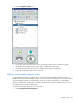
Select the Modbus Gateway icon.
3. On the floor plan, select the location where you want to place the virtual Modbus gateway object. A
graphic representing your Modbus gateway is added to your floor plan.
4. Select the new virtual Modbus gateway to configure the properties.
5. Repeat for all virtual Modbus gateway locations.
Adding a virtual PDU object
A PDU sensor monitors and reports the amount of power available on each circuit of a PDU. A virtual
PDU object is an aggregation point of all related electrical panels within the PDU, used to gather and
combine power information that is then used to calculate PUE data. A virtual PDU can have up to four
circuit panels, each associated to a PDU device or panel.
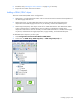
To add a virtual PDU object to your floor plan:
1. Select Configurations>General>Virtual.