
Insight Environmental Configuration User Guide




Creating a project 32
2.
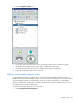
Select the Equipment Status icon.
3. On the floor plan, select the location where the equipment status sensor is installed. A graphic
representing your equipment status sensor object is added to your floor plan.
4. Select the new equipment status object to configure the properties for the sensor.
5. Repeat for all equipment status sensor locations.
Adding a virtual Modbus gateway object
A virtual Modbus gateway is a symbolic device used to associate the Modbus base stations within a
Modbus data source. Certain Modbus devices can connect directly to the Edge server, and do not require
a physical Modbus gateway to communicate to the server. In these circumstances, a virtual Modbus
gateway is added to the Configurator to symbolize the associations within the Modbus data source. It is
not required for your Modbus configuration.
To add a virtual Modbus gateway to your floor plan:
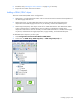
1. Select Configurations>General>Virtual.