
Insight Environmental Configuration User Guide




Creating a project 31
2.
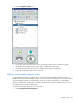
Select the Door Sensor icon.
3. On the floor plan, select the location where the door sensor is installed. A graphic representing your
door sensor object is added to your floor plan.
4. Select the new door sensor object to configure the properties for the sensor.
5. Repeat for all door sensor locations.
Adding an equipment status sensor object
An equipment status sensor consists of a base station and one CT collar, which determines whether the
equipment is receiving power currents. The equipment does not have to be powered on to verify that
power current is available to the equipment.
To add an equipment status sensor object to your floor plan:
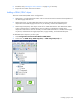
1. Select Configurations>General>Wireless.