
Insight Environmental Configuration User Guide






Creating a project 24
Creating zones
A zone is a logical grouping of wireless sensor objects within a WSN. For example, if your data center
has separate rooms, then each room might be a zone. Alternatively, a large data center room might
include multiple zones. The background image automatically divides the map into rectangle zones. A
project must have at least one zone.
Because the Imaging thermal map is configured at a zone level, selecting the zone scope affects the
imaging results from high to low granularity.
You can select to group all CRAH/CRAC objects in one zone so that all metrics for the zone are
CRAH/CRAC-specific.
To create a zone:
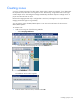
1. Add a zone using one of the following methods:
o Select Groupings>Add Zone.
o From the side of the Groupings tab, select the Add Zone icon.
o Press Ctrl+Alt+Z.
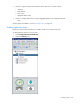
The Add New Zone window appears.
2. Enter the name of the new Zone, and then select OK.