
Insight Environmental Configuration User Guide





Creating a project 20
To create a Modbus/TCP data source:
1. Add a Modbus/TCP data source using one of the following options:
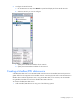
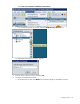
o Select Data Sources>Modbus>Add Modbus/TCP Network.
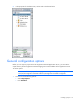
o From the side of the Data Sources tab, select the Add Modbus/TCP Network icon.
The Add Modbus/TCP Network window appears.
2. Configure the Modbus/TCP network.
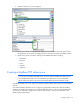
a. On the Data Sources tab, select Modbus to expand and display the Modbus networks.