
Insight Environmental Configuration User Guide





Creating a project 19
b.
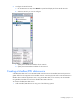
Select the network you want to configure.
c. Specify the response timeout in seconds. The response timeout is the maximum amount of time
the Application server expects the Modbus device to respond to a request. The default is 3000.
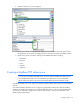
d. Specify the serial port connection settings for the Modbus/RTU device including:
— Baud Rate
— Data Bits
— Parity
— Stop Bits
— COM Port
Creating a Modbus/TCP data source
NOTE: You must install and configure the Modbus base station in your data center before
you can create a Modbus/TCP data source. You must create a Modbus/TCP data source for
every Modbus Base Station you have installed in your data center. For more information
about installing this device, see the HP Environmental Edge Hardware Installation Guide.
A Modbus/TCP data source uses TCP/IP over Ethernet to gather data from the equipment in the Modbus
network.
You create a Modbus/TCP data source to configure any equipment or BMS system that uses Modbus
interface. The Modbus/TCP network can include Modbus/RTU devices, such as an Energy base station,
connected in a daisy-chain configuration to a RTU to TCP converter, which is then referred to as the
Modbus gateway base station.