
Insight Environmental Configuration User Guide





Creating a project 17
3.
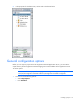
Configure the Wired network.
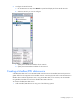
a. On the Data Sources tab, select Wired to expand and display all of the Wired networks.
b. Select the network you want to configure.
c. Specify the In Broadcast IP address for the network.
d. Specify the Out Broadcast IP address for the network.
Creating a Modbus/RTU data source
A Modbus/RTU data source is an RS-485 based network that uses the Modbus/RTU serial protocol to
gather data from the equipment in the Modbus network. Since the physical serial connection between a
Modbus device and the Application server, using an RS-485 cable, is less common, HP recommends
using Modbus/TCP data sources for the Modbus Base Station devices.
To create a Modbus/RTU data source:
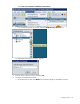
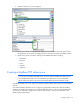
1. Add a Modbus/RTU data source using one of the following options: