
Insight Environmental Configuration User Guide





Creating a project 16
Edge server. Each Wired data source must have at least one gateway, but it can have more gateways for
redundancy or to speed the data collection process. HP recommends installing at least two gateways for
each Wired data source.
The Wired data source supports all legacy data source configurations. It is only accessible if the HP
Wired Plug-In has been installed and configured within Device Manager. For more information, see the
HP Insight Environmental Software Installation Guide.
To create a Wired data source:
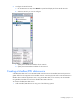
1. Add a Wired data source, using one of the following options:
o Select Data Sources>Add Wired Network.
o From the side of the Data Sources tab, select the Add Wired Network icon.
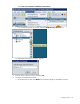
The Add Wired Network window appears.
2. Enter the name of the new network, and select OK.