
Insight Environmental Configuration User Guide




Appendix 117
5.
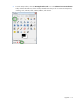
From the Gimp toolbox, select the Rectangular Select Tool icon in the Subtract from Current Selection
mode, and then de-select any of the currently selected items that you do not want to be transparent,
including racks, cabinets, PDUs, CRAHs/CRACs, and columns.
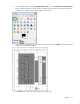
6. Select all of the areas that you do not want to be transparent, and press Delete. The transparent area
appears in a checkerboard pattern.
7. Press Ctrl+S to save that area of transparency on your floor plan.