
Insight Environmental Configuration User Guide





Appendix 111
Creating transparency for a small floor plan
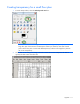
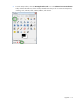
1. From the Gimp toolbox, select the Select by Color Tool icon.
NOTE: Be careful when selecting the white transparent background, especially if you have a
large floor plan. If the selection tool attempts to redraw your selection, then select a small
portion of the floor plan at a time and add transparency until the entire large floor plan has
the correct transparency.
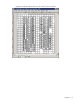
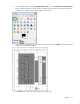
2. On the data center background image, select the common area to be transparent. The area is
typically the data center white floor tile.