
Insight Environmental Configuration User Guide





Appendix 110
b.
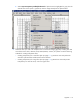
Select Layer>Transparency>Add Alpha Channel. If alpha channel is highlighted in gray, then the
channel exists. If the option is grayed out, then the image already has an alpha channel.
4. Select the areas you want to be transparent for environmental imaging (typically including floor tiles
around the various racks, cabinets, PDUs, CRAH/CRACs, columns, etc.) Select one of the following
methods for creating transparent areas:
o Creating transparency for a small floor plan (on page 111)—(Less than 100 racks) Select the
entire floor plan and then exclude items from the selection.
o Creating transparency for a large floor plan (on page 115)—(More than 100 racks) Create
transparency one area at a time, such as a logical zone.