
Insight Environmental Configuration User Guide





Maintaining an existing project 104
1.
Adjust the view ("Adjusting the view" on page 87) of the floor plan, selecting each of the objects
you want to display and clearing any objects you want to hide.
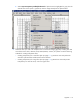
2. Select Export>Export Image.
3. Select one of the following:
o Deployment Plan—Exports a PNG image of the floor plan, including all configured devices and
objects.
o Background Image—Exports a PNG image of the floor plan that does not include configured
devices and objects.
o All Images—Exports PNG images for all defined zones.
The Save File window appears.
4. Enter the file name and location, and select Save. The image is exported in PNG format to the
location that you selected.