
Insight Environmental Configuration User Guide





Maintaining an existing project 103
Changing an object name
1. Select an object using the Select tool.
2. Edit the Name property to change the object name. For more information on changing names or
how to change multiple object names at one time, see Naming objects (on page 82).
3. Export the project ("Exporting the configuration file" on page 96) to update the system database.
Moving an object
1. Select the object you want to move, and drag it to the new location.
2. Export the project ("Exporting the configuration file" on page 96) to update the system database.
Deleting an object
IMPORTANT: If you delete an object, all historical data associated with that object is also
deleted and cannot be accessed.
1. Select the object you want to delete.
2. Press Delete.
3. Export the project ("Exporting the configuration file" on page 96) to update the system database.
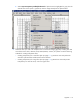
Exporting the floor plan as a PNG image (optional)
You might want to export your floor plan for documentation, archiving, or referencing purposes.