
Installing Microsoft Windows on an HP ProBook or EliteBook Notebook PC and creating an image
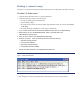
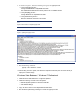
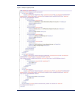


5. As shown in Figure 3, make the following changes to the sysprep. xml file:
– In the Microsoft-W indows-PnpCustomizationsN onW inPE component –
Set the Pn P driver search path.
– In the Microsoft-W indows-Deployment component –
Following the pass=” auditUser” p ha se, set Reseal in OOBE mode.
– In the Microsoft-W indows-Shell -Setup component –
Set up the Authentec Fingerprint Driver, HP Quick Launch Buttons, Intel M atrix Storage
Manager, and HP Multi-W W AN Driver Installer (for more information, refer to
Figure 1 ).
Silence the install command after passing the OOBE pha se.
N ote
Figure 3 does not show the complete sysprep.x ml file.