
Installing Microsoft Windows on an HP ProBook or EliteBook Notebook PC and creating an image




Appendix B: Sample Sysprep.inf files
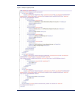
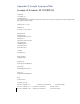
Exa mple of W indows XP SYSPREP. IN F
[ U na ttended ]
O emS kipE ula =N o
O emPnPDriversPa th =
" Drv\ Video;Drv\ N ic;Drv\ Audio;Drv\ M odem; Drv\ Misc1;Drv\ Misc2 ; Drv\ Misc3;Drv\ M isc4 ;Drv\ Misc5;Drv\ C hi pse t; Drv\ KBD;
Drv\ MSD;Drv\ USB;Drv\ N etw ork "
InstallFilesPath = " C : \ i386"
[G uiRunO nce]
C omma nd0 =c : \ Drv\ install. ba t
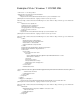
[ G ui U na tte nded]
AdminPassword=*
EncryptedAdminPassword=N O
AutoLogon=Yes
AutoLogonAccountC reation=N O
AutoLogonCount=1
O EM SkipRegiona l=0
O emSkipW elcome=0
W a itForRe boo t=N O
[UserData]
C omputerN a me=*
[Regiona lSettings]
LanguageGroup=1
[Identification]
JoinW orkgroup=W O RKG RO UP
[ N e two rki ng ]
Ins ta llDe fa ultC o mpo ne nts =Y es
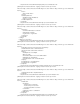
[O EM_Ads]
Background=BAC KG RN D.BMP
[Data]
UseBIO SToBoot=1
[SysprepMassStorage]
PC I\ VEN_8086&DEV_2410 = %s yste mroo t% \ inf\ machine. inf ; IN TE L PC I-ISA bridge
PC I\ VEN_1106&DEV_0571 = %s yste mroo t% \ inf\ mshdc. inf ; VIA IDE controller
PC I\ VEN_10DE&DEV_01BC = %s ys te mroo t%\ inf\ mshdc. inf ;N Vidia IDE controller