
Installing Microsoft Windows on an HP ProBook or EliteBook Notebook PC and creating an image









Appendix A: Using HP SoftPaq Download Manager
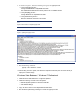
To use HP SoftPaq Download Manager, perform the following steps after manually installing
W indows:
1. Boot the W indows OS.
2. O pen Microsoft Internet Explorer.
3. Download and install HP Softpaq Download Manager from www.hp.com/ go/ sdm.
4. W hen prompted, select Show software for all supported models.
5. Select appropriate SoftPaqs from the Driver and Operating System categories.
– If duplicate titles appear, select the version with the latest release date that supports the
particular notebook PC model.
6. Select any desired software from the remaining SoftPaq categories.
7. After installation is complete, reboot the system.