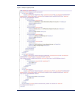
6. C opy sy sprep . x ml to % SystemDrive%\ Windows\ Sy st em3 2 \ Sy sp r ep .
7. Ru n the following command:
sysprep / generalize / audit / shutdown / unattend:sysprep.xml
8. After shutting down the system, use hard-drive duplication so f tw a re (such a s G ho st) to deploy the
common i mage.