
Installation Guide, Second Edition - HP Carrier Grade Blade Server bh3710



Chapter 5
hp Carrier Grade Server bh3710 Server Blade Installation Information
Installing and Removing Blades
5-25
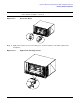
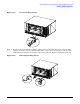
Figure 5-21 Loosen Locking Screws
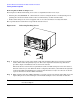
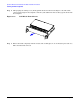
Step 3. To release the blade from the backplane, apply pressure to the left locking lever and to the right
locking lever at the same time. You should be able to “snap” the levers away from each other and
unlatch the blade from the left and right edges of the blade slot. Figure 5-22 illustrates this step.
Figure 5-22 Releasing Locking Levers