
Installation Guide, Second Edition - HP Carrier Grade Blade Server bh3710

Chapter 5
hp Carrier Grade Server bh3710 Server Blade Installation Information
Fibre Channel (FC) Disk Carrier
5-18
Fibre Channel (FC) Disk Carrier
FC Disk Carrier blade information is provided in the following sections.
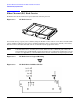
Figure 5-13 FC Disk Carrier
Server blade storage capacity can be added by using the FC disk carrier with one or two drives installed. The
carrier and drives utilize two slots and are normally installed in slots 3 and 4 (factory default), and 5 and 6.
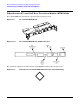
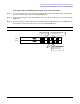
Slots that will accommodate FC disk carriers are identified by the glyph shown below:
NOTE If the FC Disk Carrier containing the bootable disk is moved to a different pair of slots, the
system will not boot to HP-UX. The system must either be reconfigured to identify the new slot
location (see Appendix A), or the FC Disk Carrier must be returned to its original pair of slots.
Figure 5-14 FC Disk Carrier Legend Marking
Figure 5-15 FC Disk Drive Bulkhead Label