
Installation Guide, Second Edition - HP Carrier Grade Blade Server bh3710

Chapter 5
hp Carrier Grade Server bh3710 Server Blade Installation Information
Fibrechannel (FC) and LAN Rear Transition Module (RTM) Blade
5-16
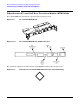
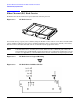
Figure 5-12 bh3710 Chassis (Rear View)
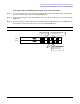
If the Payload LAN and the Management LAN are on separate LAN segments:
Step 1. In rear slot 9: Plug payload LAN (A) into RJ-45 port A (Center port) on the FC and LAN RTM
blade.
Step 2. In rear slot 10: Plug the Management LAN into the RJ-45 Management LAN Console (rightmost
port) on the FC and LAN RTM blade.
CAUTION Either Management LAN port (slot 9 or 10) may be used. However, do not use both
ports on the same switch. Failure to observe this precaution will cause network
malfunction.
Step 3. In rear slot 10: Plug a Payload LAN (B) into the RJ-45 port B (Left port) on the FC and LAN RTM
blade.
NOTE Only the LAN A port functions on slot 9. Only the LAN B port functions on slot 10.
Slot 10
Slot 9
LAN A
Mgmt
LAN
Serial
FC Loop B
Serial FC Loop A
LAN B
LAN B
LAN A
Mgmt
LAN
C o nn ec t to site
Payload LAN-A
C o nn ect to site
Payload LAN-B
C o nn ect to site
Management LAN