
Installation Guide, Second Edition - HP Carrier Grade Blade Server bh3710

Chapter 5
hp Carrier Grade Server bh3710 Server Blade Installation Information
bp2200 Server Blade
5-12
Boot Procedures
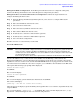
The following sections describe the procedure for booting the Boot Console Handler, booting to the HP-UX
prompt, and rebooting to HP-UX to restart the system.
Boot Console Handler (BCH) Boot Procedures
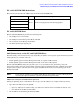
The blade will boot to BCH upon insertion in the chassis. When the boot process is completed (in
approximately one to five minutes) the BCH main menu will be displayed as shown below:
----Main Menu ----------------------------------------------------
Command Description
------------ --------------
BOot [PRI|ALT|<path>] Boot from specified path
PAth [PRI|ALT] [<path>] Display or modify a path
SEArch [DIsplay|IPL] [<path>] Search for boot devices
COnfiguration menu Displays or sets boot values
INformation menu Displays hardware information
SERvice menu Displays service commands
DIsplay Redisplay the current menu
HElp [<menu>|<command>] Display help for menu or command
RESET Restart the system
----
Main Menu: Enter command or menu
Boot to the HP-UX Prompt
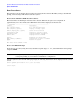
Start the boot process by using the factory default boot path. Type, BO PRI, at the BCH main menu prompt
and press
ENTER.
NOTE Booting the system to an HP-UX login prompt from the BCH main menu will take five minutes
or longer depending on your software and hardware configuration.
Once the system reaches the HP-UX login prompt, the following information will be displayed on the console
screen:
Generic SysName [HP Release B.11.11] (see /etc/issue)
Console Login: