
Installation Guide, Second Edition - HP Carrier Grade Blade Server bh3710

Chapter 5
hp Carrier Grade Server bh3710 Server Blade Installation Information
bp2200 Server Blade
5-9
GSP Reset and Transfer of Control (TOC) Buttons
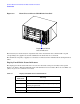
The GSP (now called MP) and TOC reset buttons, located on the bp2200 bulkhead, are described below:
CAUTION DO NOT press the TOC button unless the bp2200 blade is hung. If you press the TOC button,
the blade will immediately shut down. Failure to observe this precaution could result in loss of
customer data.
• Pressing the GSP (MP) reset button reboots the MP.
• Pressing the TOC button causes the bp2200 blade to shut down and a memory dump to occur.
bp2200 Server Blade LED Definitions
The following list describes the LEDs found on the bp2200 server blade bulkhead.
NOTE See the bp2200 chapter of the hp Carrier Grade Server bh3710 Service Guide for Attention and
Fault LED definitions.
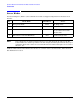
LED Color Description
LAN A and B LEDs Green Flashes intermittently when in use.
Fibre Channel A and B LEDs Green Flashes intermittently when in use.
Hot Swap LED Blue Solid blue when ready for Hot Swap; flashes
once when powering down or disconnecting
from backplane.
Attn:/Fault LED Amber Solid amber is a fault; flashing is operator
intervention/attention required.
Run LED Green Flashes once when power is applied; flashes
when the server is booting HP-UX; solid
green when OS is booted and server blade is
running.