
Installation Guide, Second Edition - HP Carrier Grade Blade Server bh3710

Chapter 5
hp Carrier Grade Server bh3710 Server Blade Installation Information
Server Blades
5-4
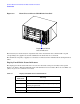
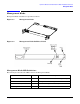
Figure 5-2 Front View of Chassis With Blades Installed
The blades may be inserted only in compatible slots on the chassis. Each slot is marked with a legend
corresponding to the glyph located on the bulkhead of the blade that is to be inserted.
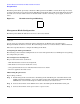
The identification legends, or glyphs, for each blade are indicated in the individual blade descriptions that
follow.
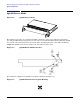
Display Panel Blade Status Indicators
The display panel blade status indicators are located on the blade cooling fan assembly vertical panel
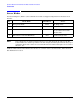
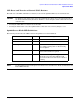
(Figure 5-2). Table 5-1lists the LED indications and definitions for server blades. There are two LEDs (one
yellow, one green) for each front server blade.
Table 5-1 Display Panel Blade Status LED Definitions
LED
Indication
Meaning
Solid Green Status OK; blade is operating
Flashing Green Non-critical user action required (e.g. boot prompt
waiting for password)
Solid Yellow Fault or system crash has occurred
Flashing Yellow Power is off or operator intervention is needed
Display Panel Blade
Status Indicators