
Installation Guide, Second Edition - HP Carrier Grade Blade Server bh3710

Chapter 5
hp Carrier Grade Server bh3710 Server Blade Installation Information
Server Blades
5-2
Server Blades
As listed in Chapter 2, Table 2-1, the standard server blade as-shipped configuration for the blade server
includes:
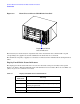
NOTE Server blade slots are numbered from bottom to top on both the front (F) and rear (R). The
bottom number is 1 and the top number is 10. For example, the Management blade always goes
in slot F10. Front slots 7 and 8 are not used at this time. Rear Slots 1 through 8 are not used at
this time, also.
Additional Fibre Channel Dual Disk Carrier blades are available and are described in the, “Fibre Channel
(FC) Disk Carrier” section.
No. Blade Name Front/Rear Slot(s)
1 Management Blade Front 10 (Single wide)
1 bp2200 PA Blade Front 1 and 2 (Double wide)
1 or 2 Fibre Channel Dual Disk Carrier Blade Front 3 and 4 (default). Slots 5 and 6
are for added carrier blade.
(Double wide)
2 Fibre Channel and LAN RTM Blade Rear 9 and 10 (Single wide)