
Security

Security 8–1
8
Security cable
✎
The security cable is designed to act as a deterrent, but may not
prevent the computer from being mishandled or stolen.
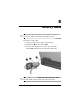
To install a security cable:
1. Loop the security cable around a secured object.
2. Insert the key 1 into the cable lock 2.
3. Insert the cable lock into the security cable slot on the
computer 3, and then lock the cable lock with the key.
✎
Your computer may look different from the illustration. The
location of the security cable slot varies by model.