
Power


1–2 Power
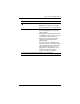
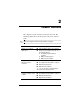
Power control and light locations
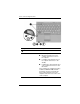
Component Description
1
fn+f3 Initiates standby.
2
Power switch When the computer is
■ Off, slide toward the front of the
computer and release to turn on
the computer.
■ In standby, slide toward the front of
the computer and release to exit
standby.
■ In hibernation, slide toward the front
of the computer and release to exit
hibernation.
If the computer has stopped responding
and Microsoft® Windows® shutdown
procedures cannot be used, slide the
power switch toward the front of the
computer and hold for 5 seconds to turn
off the computer.
(Continued)