
Power


Battery packs
Power 7–3
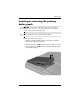
Inserting or removing the primary
battery pack
Ä
CAUTION: To prevent loss of information when removing a battery
pack that is the sole power source, initiate hibernation or turn off the
computer before removing the battery pack.
✎
Battery packs may vary in appearance by model.
To insert a primary battery pack:
1. Turn the computer upside down on a flat surface, with the
front of the computer toward you.
2. Slide the battery pack 1 into the battery bay until it is seated.
3. Press the battery pack 2 into the battery bay until the battery
pack clicks into place.