
Power

4–2 Power
Default power settings
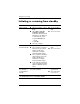
Turning the computer or display
on or off
Task Procedure Result
Turn on the
computer.
Slide the power switch toward
the front of the computer.
■ The power lights are
turned on.
■ The operating system
loads.
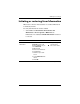
Shut down the
computer.
1. Save your work and
close all open programs.
2. Shut down the computer
through the operating
system by selecting
Start > Turn Off
Computer > Turn Off.*
✎
If the system is
unresponsive and you
are unable to shut
down the computer
with these procedures,
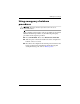
refer to “Using
emergency shutdown
procedures.”
■ The power lights are
turned off.
■ The operating system
shuts down.
■ The computer is
turned off.
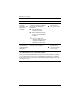
Turn off the
display while the
power is on.
Close the computer. Closing the computer
activates the display
switch which turns off the
display.
*If you have been registered to a network domain, the button you click will be
called Shut Down instead of Turn Off Computer.