
Pointing Devices and Keyboard

1–2 Pointing Devices and Keyboard
Pointing devices
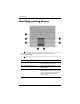
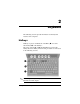
Identifying pointing devices
✎
The pointing stick and TouchPad controls can be used
interchangeably.
Component Description
1 Pointing stick Moves the pointer and selects or
activates items on the screen.
2 Left pointing stick button Functions like the left button on an
external mouse.
3 TouchPad* Moves the pointer and selects or
activates items on the screen. Can be
set to perform other mouse functions,
such as scrolling, selecting, and
double-clicking.
(Continued)