
Pointing Devices and Keyboard


4–10 Pointing Devices and Keyboard
Pen and command controls (Tablet PC models only)
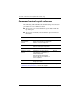
Command controls quick reference
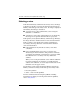
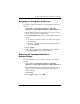
The following table identifies the default setting and activation
procedure for each command control.
■ To activate a pen-activated button, tap the button with the
tip of the pen.
■ To activate a manually activated button, press and release
the button.
Button Default function Activation
Tablet PC Input
Panel launch
button*
Opens and closes Tablet PC Input
Panel, which includes a writing pad
and the on-screen keyboard.
Pen
Rotate button* Alternates the image orientation
between landscape and portrait.
Pen
Q button* Opens and closes the Q Menu. Pen
Windows security
button*
In Windows, functions like the
ctrl+alt+delete command on a
standard keyboard.
In the Computer Setup utility,
functions like the reset button on
some computers.
Manual
Jog dial* Enters commands or scrolls the
image up or down.
Manual
*These controls are programmable. For instructions, refer to “Setting
command control preferences,” later in this chapter.