
Pointing Devices and Keyboard


Pen and command controls (Tablet PC models only)
Pointing Devices and Keyboard 4–7
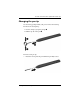
Changing the pen tip
Use the clamp packaged with your pen to remove the used tip.
To remove the used pen tip:
1. Use the clamp to grasp the pen tip 1.
2. Pull the tip out of the pen 2.
To insert a new pen tip:
» Insert the new tip into the pen until the tip is fully seated.