
Pointing Devices and Keyboard
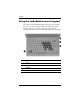

Keypads
Pointing Devices and Keyboard 3–3
Enabling and disabling the embedded
numeric keypad
Press fn+num lk to enable the embedded numeric keypad. The
num lock light is turned on. Press
fn+num lk again to return
the keys to their standard keyboard functions.
✎
The embedded numeric keypad will not function while an
external keyboard or numeric keypad is connected to the
computer or to an optional docking device.
Switching key functions on the
embedded numeric keypad
You can temporarily alternate the functions of keys on the
embedded numeric keypad between their standard keyboard
functions and their keypad functions by using the
fn key or the
fn+shift key combination.
■ To change the function of a keypad key to keypad functions
while the keypad is off, press and hold the
fn key while
pressing the keypad key.
■ To use the keypad keys temporarily as standard keys while
the keypad is on:
❏ Press and hold the fn key to type in lowercase.
❏ Press and hold fn+shift to type in uppercase.