
Pointing Devices and Keyboard


Pointing Devices and Keyboard ii
Contents
1 Pointing devices
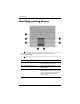
Identifying pointing devices. . . . . . . . . . . . . . . . . . . . . . . 1–2
Using the TouchPad . . . . . . . . . . . . . . . . . . . . . . . . . . . . . 1–4
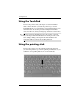
Using the pointing stick . . . . . . . . . . . . . . . . . . . . . . . . . . 1–4
Using an external mouse . . . . . . . . . . . . . . . . . . . . . . . . . 1–5
Setting pointing device preferences . . . . . . . . . . . . . . . . . 1–5
2 Keyboard
Hotkeys . . . . . . . . . . . . . . . . . . . . . . . . . . . . . . . . . . . . . . 2–1
Hotkey quick reference . . . . . . . . . . . . . . . . . . . . . . . 2–2
Hotkey procedures. . . . . . . . . . . . . . . . . . . . . . . . . . . 2–3
Initiate standby (fn+f3) . . . . . . . . . . . . . . . . . . . . . . . 2–3
Switch the screen image (fn+f4) . . . . . . . . . . . . . . . . 2–4
View battery pack charge information (fn+f8) . . . . . 2–4
Decrease screen brightness (fn+f9) . . . . . . . . . . . . . . 2–5
Increase screen brightness (fn+f10). . . . . . . . . . . . . . 2–5
Activate the ambient light sensor (fn+f11) . . . . . . . . 2–5
Display and clear system information (fn+esc). . . . . 2–5
HP Quick Launch Buttons . . . . . . . . . . . . . . . . . . . . . . . . 2–6
Presentation button. . . . . . . . . . . . . . . . . . . . . . . . . . . . . . 2–8
Info Center button . . . . . . . . . . . . . . . . . . . . . . . . . . . . . . 2–9
HP Quick Launch Buttons control panel . . . . . . . . . . . . 2–10
Opening the HP Quick Launch Buttons control
panel. . . . . . . . . . . . . . . . . . . . . . . . . . . . . . . . . . . . . 2–11
Setting button preferences . . . . . . . . . . . . . . . . . . . . 2–11
Displaying the Q Menu . . . . . . . . . . . . . . . . . . . . . . 2–13