
Pointing Devices and Keyboard - Windows Vista
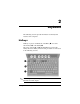

2–2 Pointing Devices and Keyboard
Keyboard
Hotkey quick reference
Hotkey procedures
To use a hotkey command on the computer keyboard, either
■ Briefly press the fn key, and then briefly press the second key
of the hotkey command.
– or –
■ Press and hold down the fn key, briefly press the second key
of the hotkey command, and then release both keys at the
same time.
To perform this function Press
Initiate Sleep fn+f3
Exit Sleep Slide the power switch toward
the front of the computer.
Alternate between computer display and
external display
fn+f4
Display battery information fn+f8
Clear battery information fn+f8
Decrease screen brightness fn+f9
Increase screen brightness fn+f10
Turn on/turn off ambient light sensor fn+f11
Display system information fn+esc
Clear system information esc or click OK