
Notebook Tour

Components
Notebook Tour 1–7
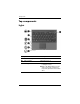
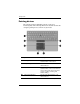
Keys
Component Description
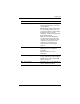
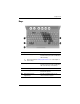
1 Function keys (6) Execute frequently used system
functions when pressed in combination
with the fn key.
✎
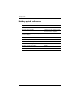
Refer to the table in “Hotkey quick reference” for a description of
each hotkey.
2 fn key Executes frequently used system
functions when pressed in combination
with a function key or the esc
key.
3 Windows logo key Displays the Windows Start menu.
4 Windows applications key Displays a shortcut menu for items
beneath the pointer.
5 Embedded numeric
keypad keys
Can be used like the keys on an
external numeric keypad.