
Notebook Tour - Windows Vista

1–6 Notebook Tour
Components
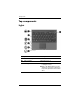
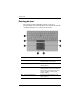
Buttons and reader
Component Description
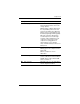
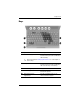
1 Fingerprint reader Allows a fingerprint logon to
Windows®, instead of a password
logon.
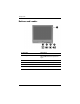
2 Presentation button Starts the Presentation feature.
3 Volume mute button Mutes and restores computer sound.
4 Volume down button Decreases computer sound.
5 Volume up button Increases computer sound.