
Notebook Tour - Windows Vista

Components
Notebook Tour 1–5
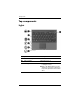
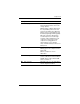
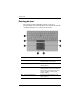
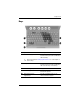
5 Right TouchPad button* Functions like the right button on an
external mouse.
6 TouchPad scroll zone* Scrolls up or down.
7 Right pointing stick button Functions like the right button on an
external mouse.
*This table describes default settings. To view and change TouchPad
preferences, select Start > Control Panel > Hardware and Sound >
Mouse.
Component Description