
Notebook Tour - Windows Vista


Components
Notebook Tour 1–13
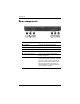
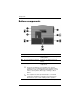
5 Info Center button Launches Info Center, which enables you
to open various software solutions.
6 Power switch* When the computer is off, slide the power
switch toward the front of the computer
and release to turn on the computer.
If the computer has stopped responding
and Windows shutdown procedures
cannot be used, slide the power switch
toward the front of the computer and hold
for at least 5 seconds to turn off the
computer. To learn more about your
power settings, select Start > Control
Panel > System and Maintenance >
Power Options.
7 Speaker Produces computer sound.
*This table describes default settings. For information about changing the
functions of the power features, refer to the user guides located in Help and
Support.
Component Description