
Multimedia

Multimedia hardware
Multimedia 1–7
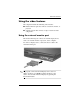
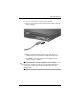
To connect a video device to the S-Video-out jack:
1. Plug one end of the S-Video cable into the S-Video-out jack
on the computer.
2. Plug the other end of the cable into the video device, as
instructed in the documentation included with the device.
3. Press
fn+f4 to switch the image between display devices
connected to the computer.
✎
If the S-Video-out jack on the computer is not accessible
because the computer is docked in an optional docking device,
connect the S-Video device to the S-Video-out jack on the
docking device.