
Multimedia

1–6 Multimedia
Multimedia hardware
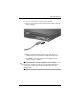
Using the S-Video-out jack
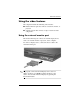
The 7-pin S-Video-out jack connects the computer to an optional
S-Video device such as a television, VCR, camcorder, overhead
projector, or video capture card. The S-Video-out jack features
3 extra pins that enable an optional S-Video–to–composite
adapter to be used with the computer.
The computer can support one S-Video device connected to the
S-Video-out jack, while simultaneously supporting an image on
the computer display or on any other supported external display.
✎
To transmit video signals through the S-Video-out jack, you
need an S-Video cable, available from most electronics
retailers. If you are combining audio and video functions, such
as playing a DVD movie on your computer using an optional
external MultiBay device and displaying it on your television,
you also need a standard audio cable, available from most
electronics retailers, to connect to the headphone jack.