
Multimedia

Multimedia hardware
Multimedia 1–3
Using the internal microphone or
audio-in (microphone) jack
The computer is equipped with an internal monaural microphone
and a stereo (dual channel) microphone jack that supports a stereo
array and monaural microphone. Using sound recording software
with external microphones allows for stereo recordings and stereo
playbacks.
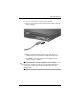
When connecting a microphone to the microphone jack, use a
microphone with a 3.5-mm plug.
✎
When an external microphone is connected to the computer,
the computer internal microphone is disabled.
Using the audio-out (headphone) jack
Å
WARNING: To reduce the risk of personal injury, adjust the volume
before putting on headphones, earbuds, or a headset.
Ä
CAUTION: To prevent possible damage to an external device, do
not plug a single sound channel (monaural) connector into the
headphone jack.
In addition to connecting headphones, the headphone jack is used
to connect the audio input function of an audio/video device such
as a television or VCR.
When connecting a device to the headphone jack:
■ Use only a 3.5-mm stereo plug.
■ For best sound quality, use 24-ohm to 32-ohm headphones.
✎
When a device is connected to the headphone jack, the internal
speaker is disabled.