
Multimedia

2–2 Multimedia
Multimedia software
Identifying preinstalled multimedia
software
To view and access the preinstalled multimedia software on the
computer:
» Select Start > All Programs.
✎
You can also reinstall multimedia software on the computer.
Select Start > All Programs > Software Setup.
Installing multimedia software from
aCD (select models only)
To install multimedia software from a CD included with the
computer:
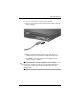
1. Insert an appropriate optical drive into an optional external
MultiBay device that is connected to the computer.
2. Connect the computer to AC power.
3. Close any open applications.
4. Insert the multimedia software CD into the optional external
optical drive.
5. When the installation wizard opens, follow the installation
instructions on the screen.
6. Restart the computer if prompted.
Repeat the installation procedure (steps 4 to 6) for all multimedia
software on CD that you want to install.