
Multimedia - Windows Vista



1–4 Multimedia
Multimedia hardware
Adjusting the volume
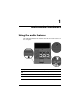
You can adjust the volume using the following controls:
■ Computer volume buttons:
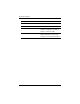
❏ To mute or restore volume, press the volume mute button.
❏ To decrease the volume, press the volume down button.
❏ To increase the volume, press the volume up button.
■ Windows® volume control:
1. Click the Volume icon in the notification area, at the far
right of the taskbar.
2. Increase or decrease the volume by moving the slider up
or down. Click the Mute icon to mute the volume.
– or –
1. Right click the Volume icon in the notification area,
and then click Open Volume Mixer.
2. In the Device column, increase or decrease the volume
by moving the slider up or down. You can also mute the
volume by clicking the Mute icon.
If the Volume icon is not displayed in the notification area,
follow these steps to place it there:
1. Right-click in the notification area, and then click
Properties.
2. Click the Notification Area tab.
3. Under System icons, select the Volume check box.
4. Click OK.
■ Application volume control:
Volume can be adjusted within some applications.