
Modem and Local Area Networks
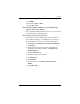
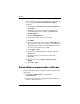
Table Of Contents

8 Modem and Local Area Networks
Modem
If you continue to receive the “No Dial Tone” error message
after clearing the Wait for Dial Tone Before Dialing
check
box:
1. Select Start > Control Panel > Network and Internet
Connections.
2. On the upper menu in the left panel of the Network
and
Internet Connections window, click Phone and
Modem Options.
3. Click the Dialing Rules tab.
4. Click your current modem location setting.
5. Click Edit.
6. Select your current location from the Country/Region
drop-down list. If you select a country or region that is not
supported by the modem, the Country/Region selection
for USA or UK is displayed by default.
7. Select Apply > OK.
8. In the Phone and Modem Options window, click the
Modems tab.
9. Click the listing for your modem, and then click
Properties.
10. Clear the check box for Wait for dial tone before
dialing.
11. Select OK > OK.
Preinstalled communication software
To use preinstalled modem software for terminal emulation and
data transfer:
1. Select Start > All Programs > Accessories >
Communications.
2. Click the appropriate fax or terminal emulation program or
Internet connection wizard.