
Memory Modules - Windows Vista


Adding or replacing memory modules
Memory Modules 9
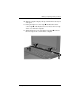
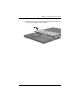
10. Turn the computer display-side up, with the front toward you
and open it.
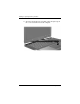
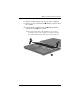
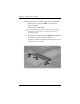
11. Lift up the right rear corner edge 1 and then the left rear
corner edge 2 of the keyboard cover to release the rear edge
of the cover from the computer.
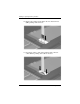
12. Tilt the keyboard cover up from the front edge 3 to release
the front edge of the cover from the computer.