
HP Compaq tc4400 Tablet PC- Getting Started - Enhanced for Accessibility Windows Vista

First-time setup
Step 3: Turn on the computer
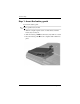
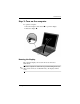
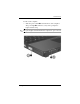
To open the computer:
1. Press the display release button 1 to open the display.
2. Raise the display 2.
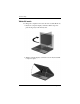
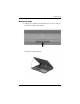
Rotating the Display
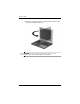
The computer display can rotate from notebook mode to
tablet mode.
✎
When the computer is docked in an optional docking device (in
either notebook mode or tablet PC mode), the display will not
rotate.
Getting Started 1–7