3–4 Drives
Hard drive
5. Turn the computer upside down on a flat surface, with the
front of the computer toward you.
6. Remove the battery pack from the computer.
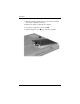
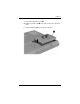
7. Loosen the 2 hard drive cover screws 1.
8. Lift the hard drive cover 2 away from the computer.