
Drives - Windows Vista


Hard drive
Drives 3–3
HP Mobile Data Protection 3D software
The HP Mobile Data Protection 3D software enables you to
■ Enable and disable HP Mobile Data Protection 3D.
✎
Depending on your user privileges, you may not be able to
enable or disable HP Mobile Data Protection 3D.
■ Determine whether a drive in the system is supported.
To open the software and change settings:
1. In the Mobility Center, click the hard drive icon to open the
HP Mobile Data Protection 3D System window.
2. Click the appropriate button to change settings.
3. Click OK.
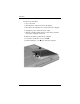
Replacing the hard drive
Ä
CAUTION: To prevent system lockup and loss of information:
■ Shut down the computer before removing the hard drive from the
hard drive bay. Do not remove the hard drive while the computer is
on, in the Sleep state, or in Hibernation.
■ If you are not sure whether the computer is off or in Hibernation,
turn the computer on by sliding the power switch toward the front of
the computer. Then shut down the computer through the operating
system.