
Hardware-Software Guide

Pointing Devices and Keyboard
Hardware and Software Guide 3–6
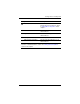
Hotkey Quick Reference
Function
Key Combination to
Activate Function
Key Combination to
Deactivate Function
Initiate standby fn+f3 Power switch
Switch between tablet
PC display and external
display
fn+f4 fn+f4
View battery information fn+f8 fn+f8
Decrease screen
brightness
fn+f9 fn+f10
Increase screen
brightness
fn+f10 fn+f9
Turn ambient light sensor
on and off
fn+f11 fn+f11
Display system
information
fn+esc fn+esc