
Hardware-Software Guide

Security
Hardware and Software Guide 14–6
HP and Windows Password Guidelines
HP and Windows passwords are not interchangeable. You must
use an HP password at an HP password prompt and a Windows
password at a Windows password prompt. For example:
■ If a power-on password is set, the power-on password
(not
a Windows password) must be entered when the tablet
PC starts up or restores from hibernation.
■ If you set Windows to prompt for a password before
resuming from standby, a Windows password (not a power-on
password) must be entered to resume from standby.
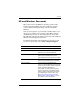
Windows Passwords Function
Administrator password* Protects Windows administrator-level
access to tablet PC contents.
User password* Protects access to tablet PC contents after
exit from standby.
*For information about setting a Windows administrator password or a
Windows user password, select Start > Help and Support.